Usability from the Other Side
When you build a website for your company, usability for your visitors and customers has to be your number one concern.
If you plan to keep up your own website, though, usability for the people doing that upkeep should also be high on the list.
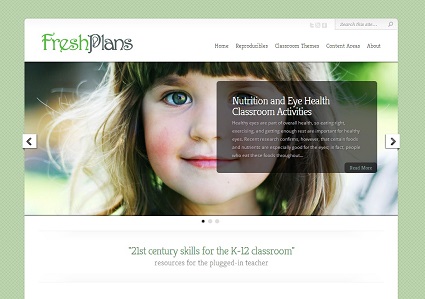
The screenshot here is from an educational website we’re building right now. The site owners will do their own blogging and they want to put in their own pictures, as well. They want to be able to change out the images in the slider or gallery, which you see here. The large photo fades into other photos — some galleries like this slide, which is where we get the common term “slider.”
We usually make sure that the home page, which often is the powerhouse when it comes to search engine optimization, is not so easily accessible that clients can get in and break it. (I just had an email from a client informing me that he had inadvertently thrown his site in the trash, so I know that happens. Fortunately, we were able to take it back out of the trash.)
We talk with clients and find out the parts of the site that they want to be able to update themselves. The blog is a common choice. This is one of the reasons we switched to all WordPress. WordPress is one of the easiest and friendliest platforms, and since style is separate from content, clients can just type in their blog posts and be confident that the styling we’ve created will take care of keeping their website looking good.
The galleries are another area clients often want to update. Galleries are small pieces of software. Some galleries are easier to work with than others. When we have a client who plans to care for their own galleries, we make sure to use the easier one. Changing it out after the fact often won’t work, so it makes sense to build that ease in when you design the website.
Other areas you might want to access frequently:
- Areas showing products, prices, and special offers
- Staff or team pages
- Store locator
Discuss with your web professionals which areas you need to access often and make sure their idea of “easy” matches yours.
Writing about their events and documenting them in photos will be part of the job of the department that owns the website shown in this post. If you’re running a business rather than an academic program, you probably won’t have people in-house taking care of your content.
It still makes sense to have under-the-hood usability in mind when you build your website. When you have your web pros go in to update your sidebar, will they be faster if the file for the sidebar is labeled “sidebar” or if it’s labeled “s4.56.FINAL”? When your professional blogger goes in to update, will it be quicker if there’s a visual editor or if each post has to be written in HTML — possibly in old HTML, since the person who built the site hasn’t kept up? When your graphics guy wants to update a photo, will pictures saved as “tablou95.xxx900x640″ slow him down?
As you’re thinking about those questions, keep your web pros’ hourly rates in mind.
Clearly, it’s important to make your website easy to work with as well as easy for visitors to use.
Website Makeover: A Financial Services Website
Northwest Arkansas financial planners Beale, Lee and Associates are rebranding their company. They’ve had significant growth and quite a bit of visibility with an ongoing radio show, major press mentions, and a forthcoming book by one of the principals. Headquartered as they are in the home of Walmart, they serve a prosperous clientele, and they have big plans for the future. They also have a new name and logo.
It was definitely time to update their website.
Their old website, which you can see below, had a lot of good content, but there wasn’t a clear path for visitors to take through the many homepage offerings.
This is a common problem. We like to imagine our visitors settling down to read the entire home page and making a leisured choice about where to go next, but that isn’t how people generally use the internet. Instead, they take a few seconds to determine whether your website has what they need or not. If they can’t find what they’re looking for, they’ll probably leave.
Tom’s new design, shown above, includes plenty of good stuff — see more screenshots below — but in a new, easier to grasp format. The main calls to action are at the top, with a clear, simple site navigation bar.
Visitors who are intrigued but not yet ready to take action are drawn down the page by visual elements that make it clear that there’s more to see further on.
They’re rewarded by video, recent blog posts, tweets, clickable information about the company’s products, event announcements, and more. See the below-the-fold below left.
The overall effect of the home page is of an exciting place worth coming back to visit again, a vibrant company with a high level of expertise and community involvement — but without any feeling of clutter or confusion. 
This is basically the goal when you have a lot going on: a sense of richness, not of clutter.
We’re using the blue of the new logo, which references the site owner’s history as a fighter pilot, and adding clouds in the background for the same purpose.
Another big change is in the video. On the old site, the video began playing as soon as the page was opened. By and large, web visitors prefer to choose whether and when to watch videos — especially if they’re sneaking a peek at your website at work.
The video on the new site is smaller, but it’s easy to click through to see more, and video is used throughout the website. We’ve added an interactive map, a snazzy new event registration system, and an easy-to-find client login feature.
The old website had no blog. There was an external blog, but blogging on your website has more SEO and conversion benefits. We’ve included a blog at the website — the main blog page is shown at right — and added pictures to make the posts more visually appealing.
The look is fresh, new, and upscale. It’s a better representation of the company and will grow with them.
Does your website need an update? You might not be rebranding your company, but you might still have outgrown your old website. Call us at 479.966.9761 if you’re not sure, and we’ll help you decide.
Is Your Website a Camel?

You know what they say about the camel: it’s a horse designed by a committee.
This can happen to websites, too. You sit down with a web firm and provide them with all the information they need to design the best possible website for you — your goals, your resources, your competitors, your target market’s characteristics, your analytics data, your aesthetic preferences — and they take all that data along with their own research and create a beautiful design that does everything you hoped it would.
After the excitement of looking at your mock ups, you share them with your friends and family. Your brother has just seen a website with the blog posts pulled onto the homepage, and he thinks yours should have that feature. Your dentist says that videos are all the rage, and thinks you should have some. Your mom suggests some brighter colors. Your golf buddy sends you a highly detailed drawing that he thinks would be a great new logo for you. That cousin who took a web design class once assures you that it’s really important for web pages to have plenty of bold type and different fonts. Your college roommate reminds you that had once said you wanted your website to have an animated bird that would swoop down as soon as the site loaded and land on the newsletter sign up form.
These are people you know, love, and respect. You know they have your best interests at hear, so you buy into their ideas. As you receive each of these suggestions, some of which might even be good ideas, you ask for changes to the mockup. At the end of the process, you are fairly dissatisfied and the designer has taken his name off the site.
Why doesn’t website design by committee work?
- You ask the wrong people. Your friends and family probably aren’t your customer. They, unlike your customers, have your best interests at heart and do not respond to your website the way a stranger who wants to buy your stuff does. They have little to no objectivity, and they probably feel that they have to give a suggestion because saying the design looks great wouldn’t show enough interest in your project. On the other hand, chances are good that they don’t actually know as much about your company, web design, or your goals as your designer does.
- Committees lack a cohesive vision. While it’s great to get input from different points of view, each narrowly-focused suggestion can put the overall design out of balance. Pulling blog posts into the homepage is a great idea and we use that approach on a lot of the websites we build — but not when there are good reasons not to, including no room for that element in a well-balanced design that includes all the essential features you identified as part of your sales funnel. Often those casual suggestions would require reworking the design completely in order to be successful, and that may not be what you really want.
- There’s a lot of misinformation out there. Many helpful suggestions are based on personal preference. Some people just really like great big photos and others think any website with cartoon characters is more fun. As the owner of the site and the person who is paying for it, you should get to lay out those personal preferences — and your designer will have taken them into account. There’s no way to indulge everyone’s fancies, because they won’t mesh, and you probably realize that. The danger is in those pronouncements like, “Google likes yellow sites better” or “Search engines only look at the first hundred words on a page.” Insisting that the people you’ve hired should base their work on myths like these will get you bad results.
Actually, a camel is not a horse put together by a committee, but a creature perfectly suited to its environment. This is what you want for your website, too. As the site owner, you will get the best results when you share your special knowledge about your business and let your designer, developer, and copywriter use the special knowledge they have about their work.
Think ahead of time about the people who should be involved in decision making for your website. You should be able to assume that your web firm is including the professional team members they should, so your team should include people who know about your business, your customers, and your competitive environment. Get their input early so it can be included in the discovery stage of your website build. And of course show everyone your mock ups, but think twice before trying to use all the suggestions you receive. After all, you only want a camel of a website if you need a camel, not if you need a horse.
Engineers’ Website Before and After
We’ve just launched a new website for a local engineering company. You can see the new look at left, and the old site below right.
The old site was, as you can probably tell, quite old. It had a no-nonsense design based on text interspersed with glamorless photos of servomotors. I had persuaded the site owner to let me stick a photo of humans at the bottom of the homepage, but that was as far as the visual appeal went.
The site owner didn’t feel a need for visual appeal. People visit his site, he explained, because their industrial machinery is broken. They’re losing thousands of dollars a minute and they don’t care what the site looks like. All they need is a phone number and a clear list of the products serviced.
We get that. However, we’ve also seen the research showing that consumers trust a modern, professionally designed website more than a website with an outdated design. We also saw traffic at the WordPress.com blog we created for the engineering company steadily gaining organic search traffic, while the main site still relied on paid traffic.

Let’s have a look at the similarities and differences between the two websites:
- We kept the client’s color scheme, basic navigation, and overall feeling. The design is clean and modern, but not a shock to the site owner’s system.
- Knowing that the product list and phone number were the most important items, we kept them right in the “Look at me!” spot at the top left of the homepage.
- We also put contact info at the top right, where people are now accustomed to looking for it.
- We added a slider gallery with photos that help communicate the services offered and the industries the company works with.
- We had previously optimized the site’s content, so we just did some updates and moved the text into the new design.
- Since this company does have competitors, we added a scannable list of “Why choose us” points and followed them up with — once again — that all-important phone number.
- The inner pages contain the same photos of machines, but they’ve been tidied up, arranged attractively, and supported by good choices in typography. See a screenshot from an inner page below.
- We built the new site in WordPress for easy updates and imported the blog from its WordPress.com home to the company website so the main site can reap the benefits of having a blog.
- We pulled blog posts onto the homepage, in case visitors who aren’t having an emergency happen by and care to read some interesting information on motion control.

This project shows that your no-nonsense business can upgrade to a more modern website without losing that no-nonsense feeling.
It’s also a good example of a migration from WordPress.com to WordPress.org. We used WordPress Importer, a simple plugin, to speed up the process. Designer Paul Fraley got the theme designed and implemented, and then just imported the files from the existing WordPress.com blog. With the blog imported, we had to do a little cleanup to suit the new theme, but it was generally simple.
The overall result is a much snazzier website. We expect that the new site will appeal to humans and search engines alike.
Add Dimension to Your Page
Sometimes you want to display a screenshot, page, or other informational item on your website. This is essentially like showing a picture of some information, but it’s a completely different thing, visually, from a photograph or drawing.

How can you make it look interesting? Let me show you a few examples.
Drop shadows
First, the example at the top of this post shows a new website we’re building which needs to feature multiple screenshots.
Putting pictures of white screens on a white background will absolutely not look good. Tom has added drop shadows to the screenshots for some dimensionality, and has also added cool little “look closer” buttons with their own shadows.

Josepha says this type of subtle, uniform shadow is more convincing than those that try to show the light as coming from one side or another, and she may be right. The effect is of a sheet hovering gently above the surface.
Three D
The Natural Fruit Corporation thought about using a flat image of the front of their product’s box, but even though it’s bright colored, it still comes across as an information sheet. Instead, the webmaster created a three-dimensional image. While this won’t make sense for a screenshot, it’s a great option for e-book covers, product packages, and similar things that could also exist in the physical world.

Like the drop shadows, this is simple for your graphics guy to accomplish. If you don’t have a graphics guy, you can use a tool like Boxshot or 3dEcovers.
Create a screen
For screenshots, you can create a screen. For a software company’s site, where we needed to show lots of screenshots, Tom created a suggestion of a screen by rounding the edges of the screenshot and using drop shadow to bring it out from the page.

1st Security USA has a new website, and Corey Trent dropped their screen shot into an image of an iPad. This is another nice way to make that screen shot more concrete.

The thing that all these solutions have in common is that they get that that bare information looking more like an object — like a sheet of paper, an electronic screen, or even a three dimensional object. It’s a straightforward way to add dimension and make that image stand out more clearly.
Above the Fold? Does It Matter Any More?
We’re polishing up a new website for a tax software company right now. Tom has created a home page that uses the color blocking that is one of the strongest trends in web design for 2013 (Josepha will be sharing the rest of her list later in the week).
Many of us have large monitors now, and the screenshot at left shows roughly what Tom sees on his monitor. The shot below right shows roughly what I see.
For me, the sliding gallery of screenshots from the software is only hinted at and the list of products is invisible.
A year or two ago this would have been an issue: only about 75% of users would scroll when they first reached a website, so the homepage had to have the important stuff above the fold. Once they reached internal pages, visitors were committed and would scroll, but the homepage was — as much as possible — complete above the fold. 
Now it’s not so much that people’s habits have changed as that there are a lot of possible folds.
People see your website on monitors and screens of various sizes, including the phone screen seen below left.
So it isn’t quite as useful to think in terms of a particular piece of screen any more.
It is still useful to make sure that everyone — regardless of their choice of device or browser — sees the most important things first when they visit your homepage.

For some visitors, what they see first is all that they will see.
That first thing should therefore be the information that answers the question, “Am I in the right place?” For business sites, that generally means a clear statement of what you have to offer and how visitors can get it.
Once visitors are sure that they’re at a website which can answer their questions and meet their needs, they’ll be willing to scroll, to click some links, or to read and watch information.
However you position your information and design elements, don’t forget that you need to communicate with the search engines as well as with your visitors. Without good rapport with the search engines, you won’t have as many visitors.
Support for Your Website
What do you do when you need changes at your company website? We probably need a flowchart here, but let’s look through the main situations in which people need support for their websites, and the possible solutions.
Is it broken?
If your website is broken — for example, it has bits of words on top of the pictures or it just looks crazy — then you probably need outside help. Your first choice should be the people who built it. If you can’t remember them, they’ve gone out of business, or it was your nephew and that’s probably part of the problem, then you should look for a web design firm. you might be better off with a new design.
However, if you know who built it and are in touch with them, you should send them two things:
- A screenshot, so they’ll know what you’re seeing. Sometimes they won’t see the same thing you see, and “My website looks crazy” is not enough information. Mention the URL (web address) you’re looking at. If you use a PC, you can push CTRL+Print Scrn and then paste into Paint to get a screen shot.
- Information about the browser you’re using, such as Internet Explorer, Firefox, Safari, or Chrome. If you can say that you saw it in IE6 on Windows Vista, that is useful information.
Is it down?
If your website just doesn’t show up when you go to your web address, or you see an error message, you need to contact your web host. We know this can be easier said than done. Sometimes clients don’t know who their host is, don’t have the login information for the account someone at their company set up and prepaid ten years ago, and can’t get hold of anyone at the hosting company.
Be persistent. With determination, you can find the company and with luck you can get some help from them. It has been our experience that many hosting companies have terrible customer service, and it can take a lot of work to get someone’s help. Just keep at it. if you have a really terrible time, consider changing hosting companies.
Do you need to change information?
Sometimes you need to change an address, add a product, or remove a staff member’s picture. If you have a content management system (CMS), you can probably do it yourself. If you don’t remember how, call the people who built the site. If you’d prefer not to do it yourself, CMS or not, send them specific instructions about what you want changed, including the page on which you’d like the change to take place.
Some companies — including ours — will do quick fixes for free. Others charge by the hour, often with a minimum fee. If that’s the arrangement you have, it makes sense to gather up all the changes you want and send them at one time; if you’re going to pay for half an hour no matter what, you should get half an hour’s worth of work.
Whatever your arrangement, you should know ahead of time. You shouldn’t get a surprise bill for several hundred dollars when you thought all changes would be free forever. Chances are, you can’t always tell what’s a five minute job and what’s a five hour job, so you should ask for an estimate before the work begins.
Do you want design changes?
Some changes are like painting your door a new color, but some are like making your Victorian house into a Craftsman bungalow. The second kind of change is a redesign and usually requires a rebuild.
It’s not your job to know what can be done as a site refresh and what requires starting over, but you should get what you want clear in your mind and express it completely. It’s unpleasant for client and web pro alike to get partway into a job and discover that it has a different scope from what was thought at the beginning. Whether you need a new paint job or a complete change of architecture, you can be quite sure that no web design job is like moving furniture. “Hmm… let’s try the slider over here instead” is only a practical approach if you’re paying by the hour and money is no object.
12 Reasons Why We Love Our Designers

We at Haden Interactive have worked with lots of designers over the years. We have the good fortune to have our choice now, but in our freelance days we had some experiences that have really made us appreciate the designers on our team.
Since it’s Valentine’s Day, a great day to think about the people we love and the prior experiences that make us appreciate them all the more, we want to offer you some reasons to love your web designers. If you haven’t yet settled on a designer, feel free to use these as criteria for choosing your designer — or, hey, just give us a call at 479.966.9761 and you can work with ours!
- Our designers realize that the websites, logos, and sales materials they design are supposed to work, not just to be admired.
- They realize that usability and clarity are the starting points, not things to be added in later if it doesn’t interfere with their creative vision.
- They don’t think that a really big photo with an About Us button counts as a web design.
- They recognize that color and images in websites are intended to communicate things about the company that owns the website.
- They find ways to be creative and forward-thinking that don’t involve hiding the navigation.
- They respect the content.
- They respect the client, even when the client wants things that cause revulsion in their artistic souls.
- They have artistic souls.
- They get all the jokes at The World’s Worst Website.
- They are meticulous about code.
- They don’t give up on being meticulous about code just because that requires learning new things all the time.
- They create beautiful things, in spite of the limitations of the preceding 11 points.
Website Before and After for a Theater Company
We’re getting the finishing touches completed for a new website for the Pushcart Players, a theater troupe specializing in family audiences and school performances.
You can see their current website below at right, and the new one at left. The immediate impression is of course very different. Pushcart’s current site has been around for a long time and things have changed on the web: the technology, of course, but also the expectations of visitors when they come to websites. The old site really doesn’t express the quality and stature of the company.
Pushcart wanted to be sure to have the information from their old site at the new one: study guides, videos, photos, and descriptions of all their plays, plus a “donate” button, information about their sponsors, and their social media icons.
They wanted a playful, colorful feeling, and they wanted it to be easy to book a show so schools wouldn’t hesitate.
We wanted them to have an up to date, standards compliant website that would make people want to explore, and we wanted the content to be findable and readable. A lot of great content was hidden away in their old website. We also wanted them to have analytics so they could be strategic about increasing visits to their site, and good ways to capture visitors’ information for their mailing list. 
Designer Tom Hapgood created a happy, lively site that looks fun and exciting without being cluttered. The navigation is special and unusual, but also clean and easy to use. There were too many options before, and it was hard to get from one interior page to another without having to click back and forth.
There were a lot of treasures hidden in the depths of the old website. We made cool flipbooks from some old-school text games, embedded multimedia files directly into the pages, and put articles into a “News” blog section so it will be easy for the Players to add more when they feel inspired.

We’re building the site in WordPress so Pushcart can easily create pages that let them communicate internally. Password protected pages and posts let the company communicate with actors and schools easily.
Without analytics from the old site, we can’t gauge before and after results directly, but we’re guessing that busy members of the press will be more inspired by the new site and more likely to use the easy navigation to learn more about the company, so we’re hoping that the new website will help Pushcart Players with their promotional efforts as well as appealing more to their customers.
We collaborated with Pushcart on their content, making it more search engine friendly while maintaining their special voice.
All in all, it was a pleasure to work with the artists of Pushcart, and we’re looking forward to launching the site.
Make Your Company Stand Out

Here you can see a screenshot from a new website we’ve just launched. The site came with some interesting challenges. This site belongs to a medical supply company serving government agencies, particularly Veterans Administration hospitals.
The company doesn’t manufacture products, and they don’t have exclusive distributorship, so they’re basically selling commodities.
What’s a commodity? It’s an item that people want, but which they think will be the same no matter where they buy it. Eggs, for example, or batteries. You have probably never heard anyone say, “I’m going to get batteries from Store Y — they’re better than those at Store X, so it’s worth the extra drive” or “I like to get my eggs from that other grocery store, because they have a better selection.”
You have certainly heard people say they prefer one doctor over another, or that this wine shop has a better selection than another.
And yet there are reasons for people to come to you rather than to your competitors. How do you convey that with your website?
In the case of the medical supply company, we were able to identify three points that made this company different from others:
- They make a real effort to find and contract with innovative products.
- They offer an unusually high level of service.
- It’s a small family company, and the owners are willing to present themselves in that way.
Our challenge, then, was to create the simple website they wanted, and make the point that — in addition to hand sanitizer and scrubs — they have nanotechnology bandages and special medical IT carts. We also needed to make their website show the fact that they’ll treat their customers like family, and that their family is one that their customers can relate to.
We started with the navigation. Instead of dividing the products into Medical Supplies, Office Supplies, and Janitorial Supplies, we made separate pages for the very special products they offer.

We made sure that it was clear on the homepage that the company has 10,000+ products, but we want the website to compete in search and conversion on the basis of their special brand name products.
On the About Us page, we used family photos and family history the owner shared with us. We set up a News page, too, which has a relevant news feed brought in automatically, but which the owner can also use to share family news, what he’s reading, and other more personal items that will help to create a connection between the company and the customers.

Knowing the target market intimately allowed the site owner to work with us to tailor the message precisely.
Finally, we made some bold promises about the service customers could expect.

We didn’t use graphics, because the message is intended to be simple, direct, personal, and sincere. Obviously, this only works if it’s true. We put this message at all the decision points we identified, in different ways.
Determining the special things about the company and then using that information to inform the site architecture, design, and content of the website let us create a website that gets the point across. Your company can do the same:
- Figure out how you’re different from your competitors.
- Determine the kinds of words and images that will best express those differences.
- Make sure you get them into your website where people can see them.
I’ve always said that marketing is mostly about doing a great job and letting people know it. You can do that even if you’re selling a commodity, and your website can help you.
SEO Makeover
We’ve just launched a new website for Born Again Pews, a company in Oklahoma that builds pews, pulpits, and related furniture for churches.
You can see the new site at left and the old site below.
The new site is certainly more attractive, but that’s not the only change. The site owner contacted us originally because — in spite of some hard work over many months — they weren’t showing up in search engine results.
The company’s business is conducted almost entirely online. Most churches buy pews very rarely (maybe once in a century) so the opportunities for long-term customer relationships are limited. The company is in a small town, but they build pews for churches all over the country, load them up, and install them. Local advertising and even word of mouth are of limited value in their situation. Certainly, the website is very important to them.
When we had a look at their old website, we saw some indications that someone had tried out some old SEO methods that are no longer appropriate. For example, numerous keywords were bunched together in faint type in the footer:”Church Furniture, Church Pews, Church Pews For Sale, Oak Church Pews, Padded Church Pews and Wood Church Pews at affordable prices. Browse our selection of Church Pew, Church Pew For Sale, Oak Church Pew, Padded Church Pew, Pulpit Furniture and Wood Church Pew products.” Nowadays, this kind of content is considered “keyword stuffing” — an intentional attempt to game the system. (Read more about why that was done long ago and why it isn’t useful now in “Search Engines 101.”)
On the other hand, there were many internal pages that had almost no words at all — just pictures, and those without alt text or thoughtful titles. For example, a picture would be titled “iqvif-skebp-glvht-photo_2_(5)_thumb.jpg” when it could more usefully have been titled “oak-church-pew.”
We built a new website with plenty of keyword-rich content, an updated design, modern code, and more attractive galleries. We built it on a WordPress platform so the owner can easily update everything. These changes are not directly related to SEO — except that they are likely to gain better links for the website — but they are important for conversion.
The new site loads faster and will probably be more appealing to visitors. The additional content will help the site communicate better with search engines, instead of looking as though they’re trying to use tricks to rank. The new WordPress blog will be easier to keep current, too, so that the owners will have a better chance of gaining the SEO benefits of regular blogging. Social media is not currently part of the company’s online marketing strategy, but we built the site to accommodate social media integration without design changes in future. All of these changes will help make the site much more findable, as well as more appealing to their visitors.
Does your company website need a makeover? Call 479.966.9761 and talk with Julianne about your needs, or contact us via email. We’d love to work with you.
Color of the Year 2013, Revised

We announced that Monaco Blue was Color of the Year 2013 back when, well, everyone else was announcing that. However, it appears that Monaco Blue was only a “top color.” The Color of the Year for 2013 is actually Emerald.
From the point of view of the web, Emerald is more interesting than blue, which is so basic to computers that it’s very hard to get excited about it.
Emerald, or #019875, is quite different. We rarely see this color in websites. There are plenty of green websites, of course — we’ve got a couple of them in our gallery — but they tend to be a more yellow-green shade like that of the Family Chiropractic Center:

You also see sage greens like the main color at FreshPlans:

The closest match in our collection is the forthcoming MySocialForecast site:


Looking around the web, we’re not seeing emerald yet. There wasn’t much tangerine last year at this time either (Color of the Year 2012: Tangerine Tango), and by now there are plenty, so we’ll expect to see more as the year continues.
Chances are, blue will still beat out emerald when it comes to websites in 2013.